



05-12-2018, 02:22 PM
How to Open New Thread , Post Pictures & Videos
1) How to Open New Thread
You are allowed to start a new thread only when you are registered with Xossipy.
To create a new thread, go to the appropriate sub-forum where you intend to open a thread, Test Area for instance.
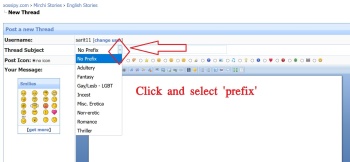
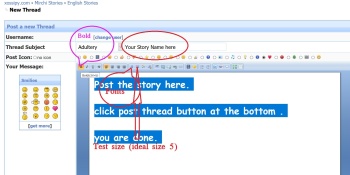
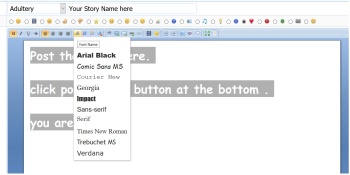
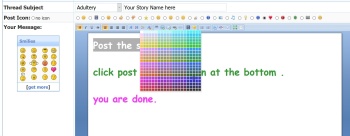
Once you are in the appropriate sub-forum, click on the icon which reads 'Post Thread', select an appropriate prefix, give a caption/title for your thread in the 'Title' field, input the message you want to convey in the 'Message' field, hit the 'Post Thread' button at the bottom, and a thread would be created.

After creating your thread.
you continue the story by clicking New Reply , or Preview Post Buttons and add your story.
1) How to Open New Thread
You are allowed to start a new thread only when you are registered with Xossipy.
To create a new thread, go to the appropriate sub-forum where you intend to open a thread, Test Area for instance.
Once you are in the appropriate sub-forum, click on the icon which reads 'Post Thread', select an appropriate prefix, give a caption/title for your thread in the 'Title' field, input the message you want to convey in the 'Message' field, hit the 'Post Thread' button at the bottom, and a thread would be created.
After creating your thread.
you continue the story by clicking New Reply , or Preview Post Buttons and add your story.
