How to Open New Thread , Post Pictures & Videos

Showing only the posts of sarit11: 10 of 43 posts. Show all posts
#1
Heart 

How to Open New Thread , Post Pictures & Videos

1) How to Open New Thread

You are allowed to start a new thread only when you are registered with Xossipy.

To create a new thread, go to the appropriate sub-forum where you intend to open a thread, Test Area for instance.
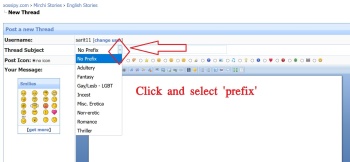
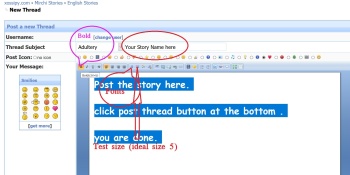
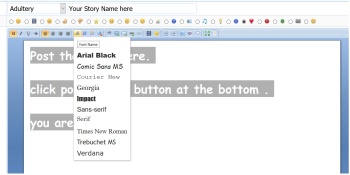
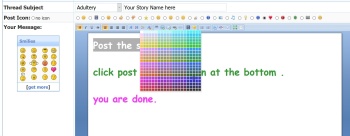
Once you are in the appropriate sub-forum, click on the icon which reads 'Post Thread', select an appropriate prefix, give a caption/title for your thread in the 'Title' field, input the message you want to convey in the 'Message' field, hit the 'Post Thread' button at the bottom, and a thread would be created.

[Image: DNEqoVnh_t.jpg][Image: new-thread.jpg]

[Image: kCqAqSgE_t.jpg]

[Image: VvgjfUl6_t.jpg]

[Image: vZfcNgkR_t.jpg]

[Image: B41N7xbp_t.jpg]

After creating your thread.
you continue the story by clicking New Reply , or Preview Post Buttons and add your story.

 horseride  Cheeta    
Like Reply
Do not mention / post any under age /rape content. If found Please use REPORT button.
#2

You can also use  one of these to post pictures.


http://pixhost.to

http://imagebam.com

http://fastpic.ru

https://imgbox.com

https://imagetwist.com

https://pimpandhost.com

These last two some times delete adult pics.


https://imgur.com

https://ibb.co 

 horseride  Cheeta    
Like Reply
#3

[Image: tgf3u6h1pl4a.jpg]

[img][Image: tgf3u6h1pl4a.jpg][/img]

Code:
[url=https://ibb.co/7rHrFt0][img]https://i.ibb.co/MPbPLkJ/tgf3u6h1pl4a.jpg[/img][/url]

are you inserting the link in (insert an image option) after uploading the pic.

the link in the above code is to be posted directly in to reply post.


Code:
https://i.ibb.co/MPbPLkJ/tgf3u6h1pl4a.jpg

and this link is to be posted in to (insert an image option).


[Image: img-insrt.jpg]

 horseride  Cheeta    
[+] 1 user Likes sarit11's post
Like Reply
#4

(09-06-2020, 11:58 AM)twinciteeguy Wrote:  yes I am pasting the URL in insert image option and then click insert

Ok , Now i think you got the answer.

Difference between the two links.


Code:
[url=https://ibb.co/7rHrFt0][img]https://i.ibb.co/MPbPLkJ/tgf3u6h1pl4a.jpg[/img][/url]


Code:
https://i.ibb.co/MPbPLkJ/tgf3u6h1pl4a.jpg

 horseride  Cheeta    
[+] 1 user Likes sarit11's post
Like Reply
#5

Sorry dear.

After seeing all the possibilities , we have limited it for 10 Pics per post.

If there are 20 posts per page . Then it will be 200 pics in a page.

Hope you can understand.

Thank you.

 horseride  Cheeta    
Like Reply
#6

(26-08-2020, 05:31 PM)Chuland Wrote:  How to edit the thread name?

Full edit the first post of the thread.

then you can edit the thread name and prefix also.

 horseride  Cheeta    
[+] 1 user Likes sarit11's post
Like Reply
#7

(29-09-2020, 03:45 PM)Rajrai Wrote:  Hai I have posted 1 story recently in just one page
I want to continue now further
How to add new page

you go on posting at the bottom of the thread , in Quick reply box , you have created.

after completing 20 posts , a new page will be created automatically.

 horseride  Cheeta    
Like Reply
#8

(02-10-2021, 04:37 AM)HectorFenwick Wrote:  May I post an excerpt from an erotic novel I have self published?

Yes my dear you can post it.

 horseride  Cheeta    
Like Reply
#9

(07-04-2026, 06:23 AM)adams_masala Wrote:  I need help changing title of a story I posted. What’s the process?

which story , 
give me the thread link and new title

 horseride  Cheeta    
Like Reply
#10

(15-05-2026, 12:37 PM)opendoor Wrote:  Sarit bro, in edit or reply mode, we cant see Upload Image option, we have only Insert Image option. can we allow Upload option in Edit/Reply mode also ?


Sorry dear 

Not possible. 

You can use Insert Image option.

 horseride  Cheeta    
[+] 1 user Likes sarit11's post
Like Reply


Users browsing this thread: 1 Guest(s)